
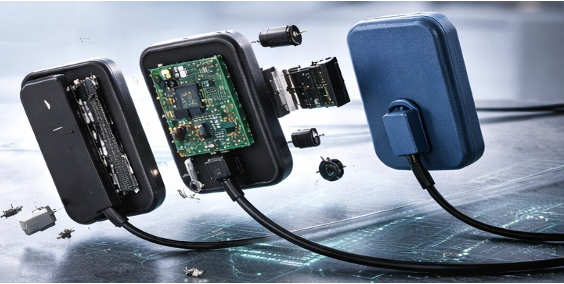
Top X-Ray Sensor Failures: Why It Matters for Extending Your Sensor’s Lifespan
An Imagin System field technician’s perspective on the failures and repairs of digital X-Ray sensors
After years of opening up sensor housings, re-terminating cables, and telling dental customers “yes, this one’s fixable” or “no, this one isn’t,” a pattern becomes obvious: most sensors don’t die of old age. They die of the same handful of preventable injuries, over and over, in every dental operatory in the country. What’s changed in the last two to three years is that manufacturers have finally started designing sensors as if they know this to reshape how long a sensor actually lasts in a working dental office. But most OEMs do not fully support the repair of X-Ray sensors and out of warranty, do not repair sensors at all. The companies who do support X-Ray sensors see failures of every kind – but ten failures are the most common – and the most repairable.
X-Ray Sensor Usage By the Numbers
According to September 2026 updates to the Market Growth Reports there are an estimated 180,000 to 185,000 dental intraoral X-ray sensors in use across the United States today – the majority of which use CMOS (Complementary Metal-Oxide Semiconductor) technology. Private dental practices use 150,000 sensors or 83% of the market while dental hospitals, universities and academic dental schools use approximately 30,000 sensors. (Most dental practices with multiple operatories – still only have one X-Ray sensor that is shared across patients daily).
Top 10 Reasons X-Ray Sensors Stop Working — and What Can Actually Be Done
1. Cable fraying or internal wire breaks near the connector. This is by far the most common sensor failure. Constant cable bending during patient positioning fatigues the copper conductors inside the jacket long before the outer insulation shows visible damage. Since the cable provides two-way transit for digital imaging data, a frayed cable can cause data transmission errors and data corruption which result in image artifacts or no image at all. Repair: Re-terminate or replace the X-Ray’s cable assembly; on repairable-cable models this is a same-day fix. On sealed units, this requires opening the housing to splice or replace the cable and re-sealing the case. Opening and resealing the X-Ray sensor case is very doable but requires experienced technicians that have precision tooling to open the sensor and requires more labor. However the expense is worth it if it adds two-plus years of more life to the X-Ray sensor.
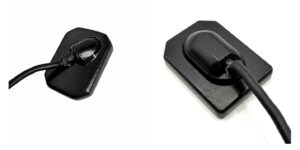
2. Cracked or dented outer housing from drops or bites. Sensors get bitten, dropped on tile floors, or crushed in a drawer. Repair: If the internal CMOS chip and circuit board survived the impact, the housing can often be replaced or re-sealed. Most of its original cost is in this CMOS chip and the circuit board. If these are functioning then the X-Ray sensor is still good. This is a reason to stop using the sensor immediately rather than continuing — a compromised housing is an open door for moisture, and continued use converts a cheap housing repair into an expensive board repair. It is often the moisture from a cracked housing that then impacts the chip and circuit board.
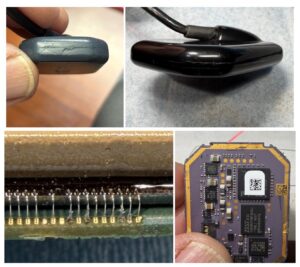
3. Moisture and disinfectant ingress causing internal corrosion. Barrier sleeves fail, disinfectant wipes get too aggressive, or a hairline housing crack goes unnoticed. From these tiny cracks, corrosion creeps across circuit traces over weeks, not seconds, so the sensor often “just stops working” one day with no obvious trigger. Repair: Ultrasonic cleaning of the affected board, corrosion removal, and replacement of any corroded traces or components and of course repairing the sensor housing — are possible if caught before the corrosion reaches and destoys the imaging chip and the circuitry itself.
4. Damaged USB connector or port. Repeated plugging/unplugging, or connecting through a hub or extension cable, wears out the USB-A/USB-C connector on either the sensor cable or the computer. Repair: Straightforward connector replacement on the cable end; if it’s the computer’s port, that’s not a sensor problem at all — always test in a different port before sending a sensor out for repair. We find it is usually also a good idea to replace the entire cable when the cable connector is replaced, to substantially extend the life of the X-Ray Sensor.
5. Outdated or conflicting drivers/firmware after a software or OS update. Windows updates and imaging-software upgrades regularly break sensor drivers that haven’t been updated in parallel. Old computers and laptops may not even be compatible with newer OS updates. This looks exactly like a hardware failure to office staff. Repair: But it is not a hardware repair at all — reinstall or roll back the correct software driver version, and always test a driver update on one workstation before deploying practice-wide. If your computer is more than 5 years old, consider upgrading your older PC with a new one to ensure new PC operating system updates are fully compatible with your PC hardware since the software drivers of your dental devices always require the latest OS software.
6. Intermittent connection caused by internal wiring or solder joint failure. When a sensor only works with the cable held at a specific angle, that’s diagnostic: a (tiny) wire or solder joint inside the housing or connector has partially separated. Many of the sensor wires can be completely broken. Repair: Opening the connector or housing, reflowing solder joints or repairing wiring, and testing under mechanical stress before resealing. We have invested in equipment that can even repair individual micro-wires that connect the chip to the circuit board. A high-powered microscope is required to do this kind of precision wire-repair work. These chip-to-board wires are micron-level thin.
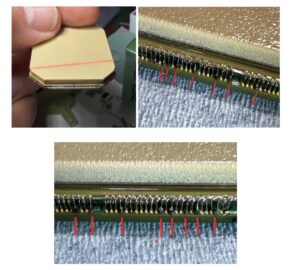
7. Fixed image artifacts — lines, dead pixel clusters, or dark spots. Unlike a random glitch, artifacts that appear in the exact same location on every image indicate physical damage to the CMOS imaging array itself, usually from an impact or a static discharge event. Repair: Limited pixel damage can sometimes be masked with software correction, but true chip damage generally isn’t field-repairable — this is one of the few failures that usually points toward replacement rather than repair.
8. Electrical surge or static discharge damage. Power fluctuations, ungrounded outlets, or static discharge through the USB line can fry the sensor’s power regulation or imaging circuitry instantly. Repair: Replacing the damaged power-regulation components is possible if the imaging chip itself wasn’t affected; a surge protector on the sensor’s USB line is cheap insurance against a repeat problem caused by a power surge.
9. Blurry, distorted, or inconsistent images from calibration drift. Not all image-quality complaints are hardware failures — sensors can drift out of calibration from normal use. Repair: Software recalibration through the imaging suite’s built-in tools, which resolves this the majority of the time without opening the sensor at all.
10. Cumulative wear and dose-cycling degradation at end of service life. After tens of thousands of exposures over 5–7+ years, CMOS sensitivity and image consistency can degrade gradually even without a single dramatic failure event. Repair: This is the legitimate “it’s just worn out” category — recalibration and cable service can buy time, but once image quality degrades at the chip level from accumulated exposure cycling, sensor replacement is the honest recommendation rather than a repeated cycle of small repairs.
The Practical Takeaways
Roughly 80–90% of what walks through a sensor repair shop — cables, connectors, housings, drivers, calibration — is genuinely fixable, usually for less than a thousand dollars against a $11,000 (new sensor) replacement cost. These repairs will extend the usable life of your X-Ray sensor and they should come with a 6-month warranty for the repair.
The newer generation of sensors, built around repairable cables, sealed housings, and wireless or boxless architectures, is pushing more failures into that “cheap and fixable” category and fewer into the “chip is dead, buy new” category. The best thing a dental practice can do for sensor longevity, regardless of which model is on the tray, is simple: stop using a sensor the moment the housing is compromised or the cable shows any fraying, and get it to a technician before a cheap fix turns into an expensive one or a sensor replacement